
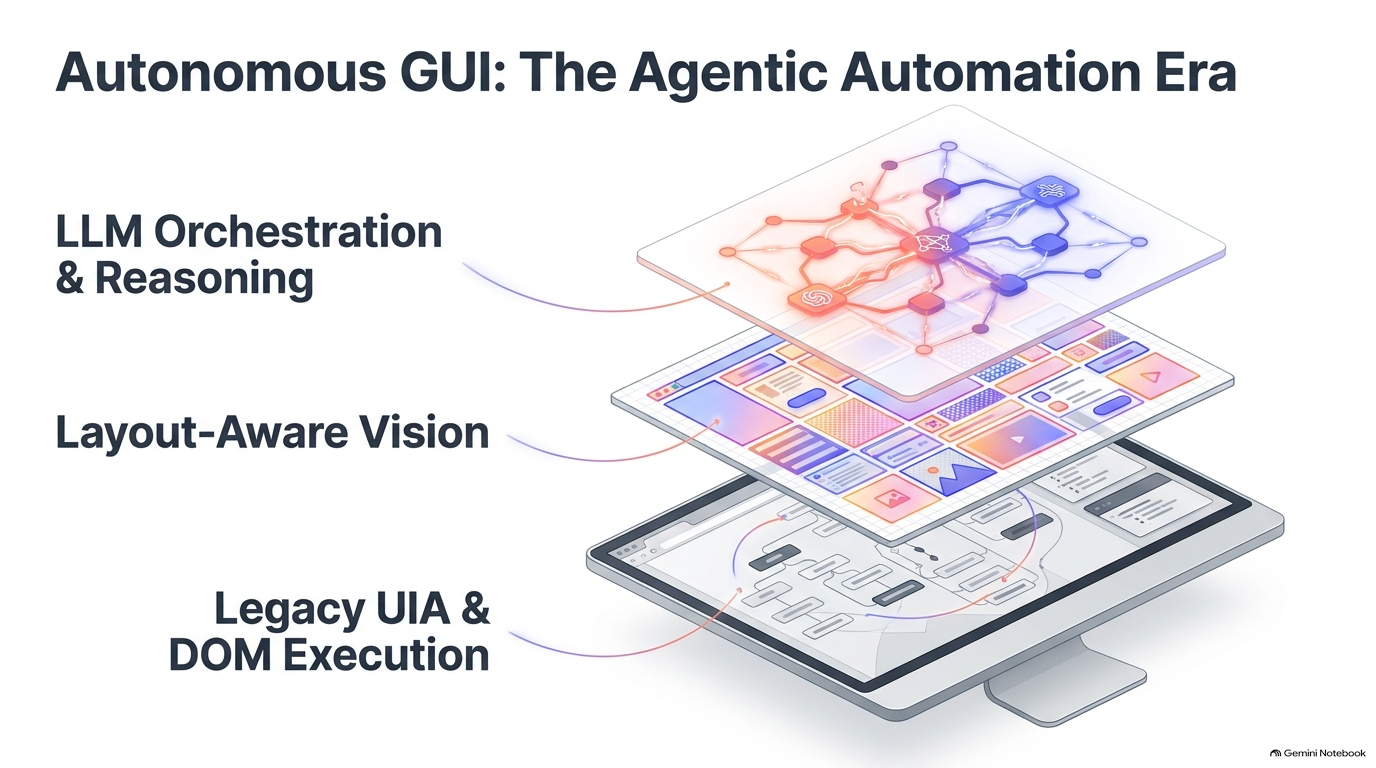
Autonomous GUI Automation: Building Hybrid, Agentic, Self-Healing Systems
Desktop automation is entering a different engineering regime. The goal is no longer to script a fixed sequence of clicks. Modern systems are expected to interpret intent, understand changing interfaces, recover from broken locators, and coordinate multiple tools while still executing actions with production-grade precision.
That creates a fundamental tension. Large language models are strong at planning and semantic reasoning, but they are not naturally precise enough for deterministic GUI control. Traditional UI automation is fast and exact when the accessibility tree is stable, but brittle when applications expose custom controls, regenerate identifiers, or move outside the reach of a standardized DOM-like structure.
The practical answer is a hybrid architecture: agentic reasoning for orchestration, layout-aware vision for grounding, and native automation APIs for reliable execution.
1. Why Desktop Automation Is Harder Than Web Automation
The browser benefits from a standardized Document Object Model. Web automation frameworks can usually inspect a structured hierarchy, identify elements with stable selectors, and execute operations against a relatively uniform abstraction.
Desktop software is fragmented. A single enterprise workflow can cross Win32, WPF, WinForms, UWP, Electron, Qt, Java Swing, SAP GUI, remote desktops, and custom-rendered surfaces. Microsoft UI Automation helps normalize part of this landscape, but it is not a complete universal layer. Custom drawing, virtualized controls, legacy applications, and remote sessions can all weaken or remove semantic element access.
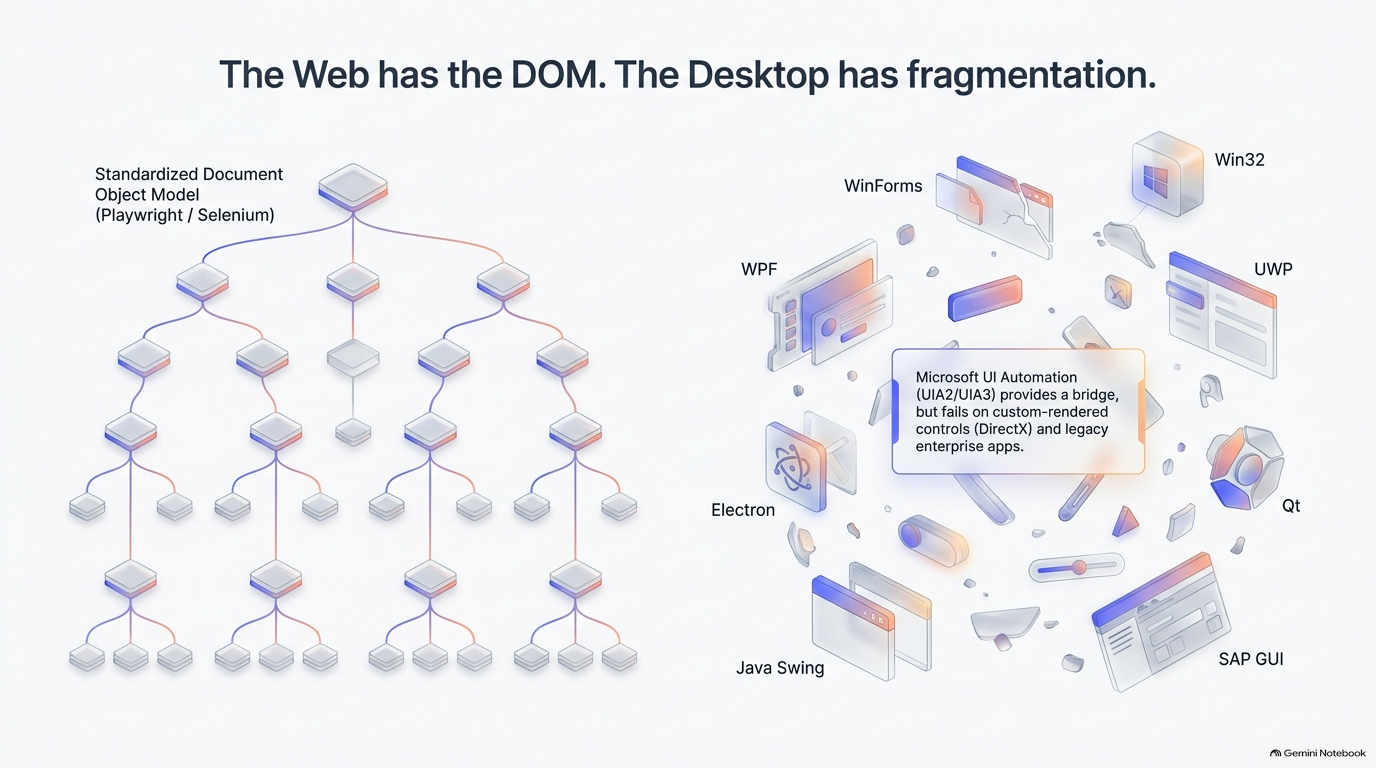
This fragmentation changes the design goal. A desktop automation platform cannot assume that one locator technology will work everywhere. It needs multiple ways to observe the interface and multiple ways to act on it.
2. The Screenshot-Action Loop Is Useful, but Not Sufficient
A vision-first agent can operate in a simple loop: capture the current screen, interpret the visual context, plan the next input, then issue a click or keystroke. This is attractive because it works even when no structured accessibility tree is available.
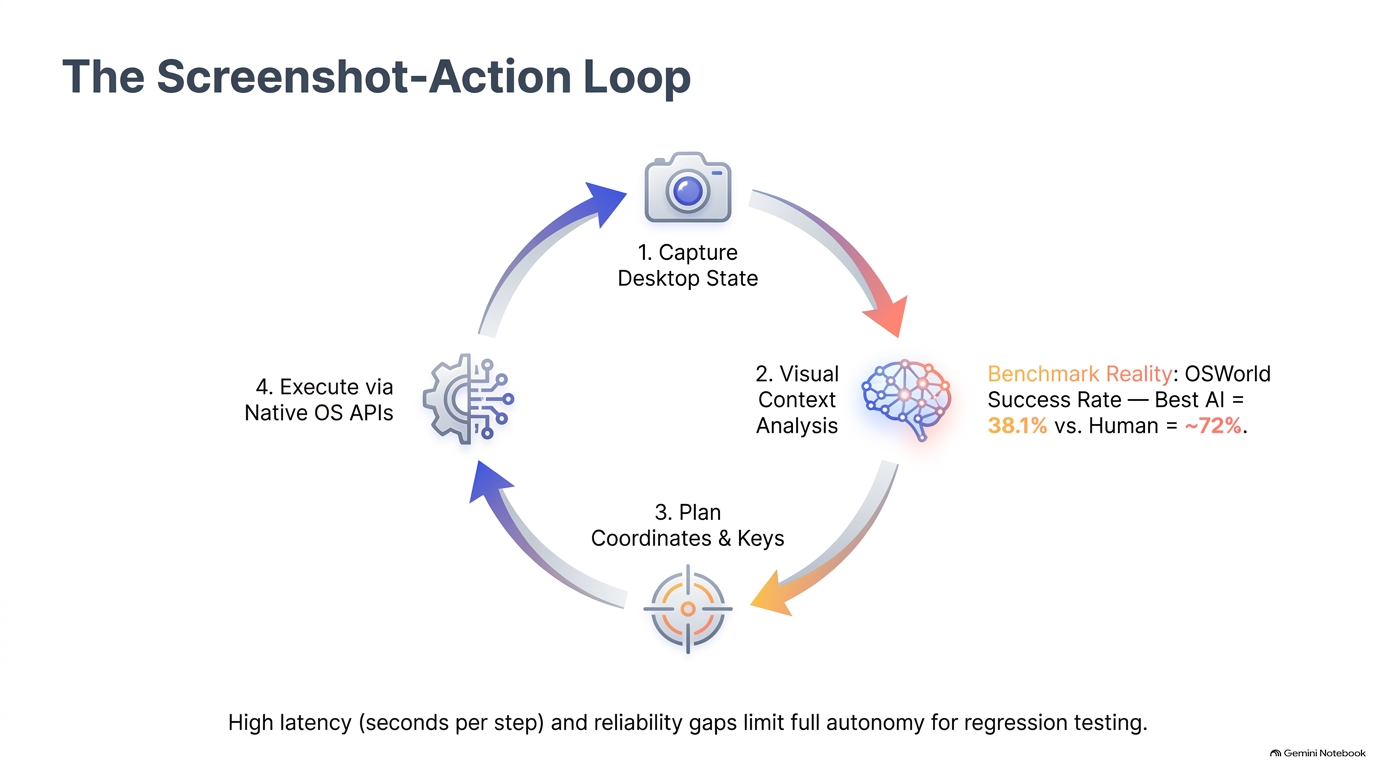
The weakness is operational. Every step may require image capture, model inference, coordinate selection, action execution, and another verification pass. That increases latency and creates multiple opportunities for grounding errors. It is acceptable for discovery, recovery, and low-frequency workflows; it is much less attractive as the sole mechanism for high-volume regression suites.
The engineering implication is straightforward: use pixels when you need broad reach, not when you already have a precise machine-readable control surface.
3. Separate Semantic Reasoning from Pixel Grounding
One of the strongest architectural ideas in the deck is to decouple two tasks that are often collapsed into a single multimodal prompt:
- understanding what the user intends to do;
- determining exactly where that intent maps onto the current interface.
A frozen multimodal model can convert natural-language intent into a structured description of the desired target. A layout-aware visual detector can independently extract geometric candidates from raw pixels. A cross-modal matcher can then score the candidates against the semantic target.
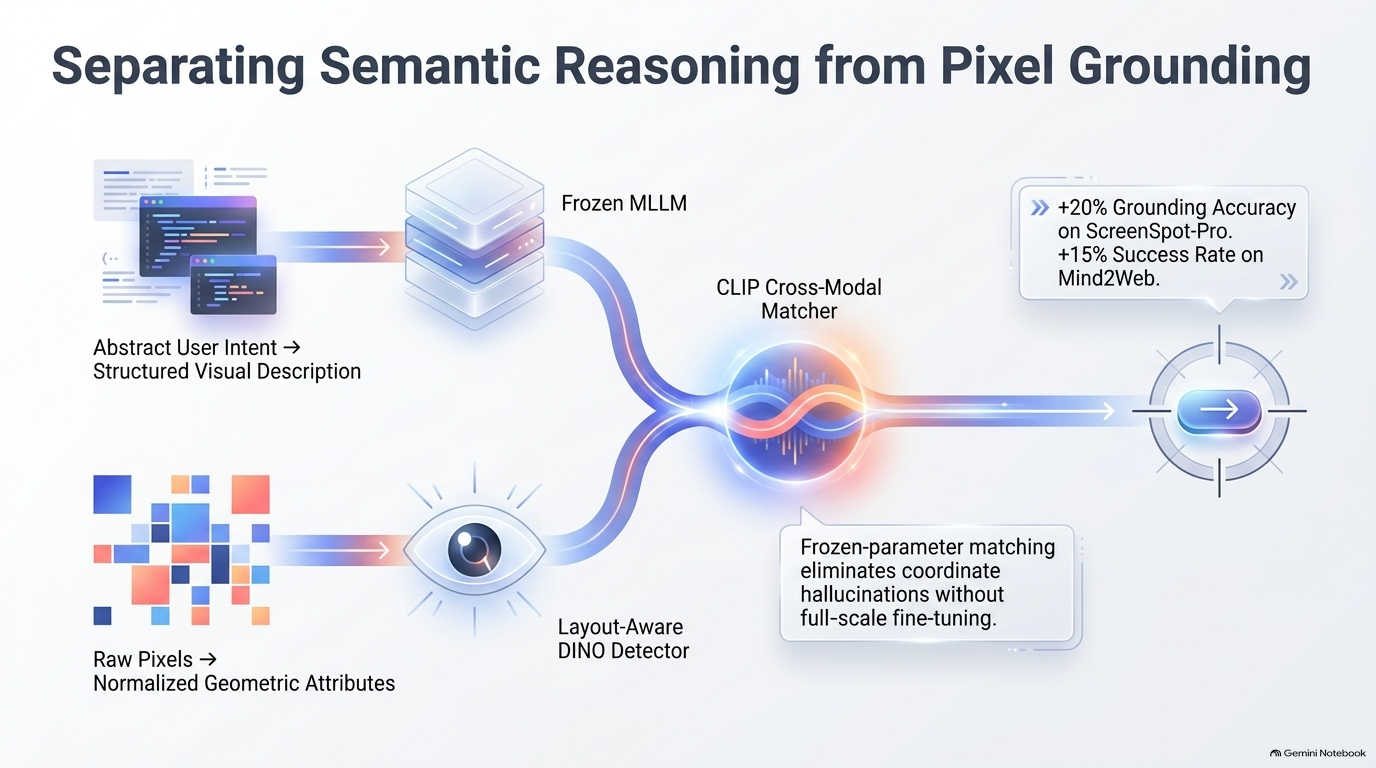
This separation reduces the need to ask a generative model to invent both meaning and coordinates in one step. The agent reasons in semantic terms such as “Save button in the File menu,” while the grounding subsystem resolves that description to a concrete element or bounding box.
For production systems, this also improves debuggability. When an action fails, engineers can distinguish a reasoning failure from a localization failure instead of treating the whole step as an opaque model error.
4. The Agent-Computer Interface Should Be Dual-Input
A robust agent should observe the desktop through more than one channel. Visual input captures what is actually rendered. Accessibility and automation trees provide precise element metadata when available. These channels are complementary rather than competitive.
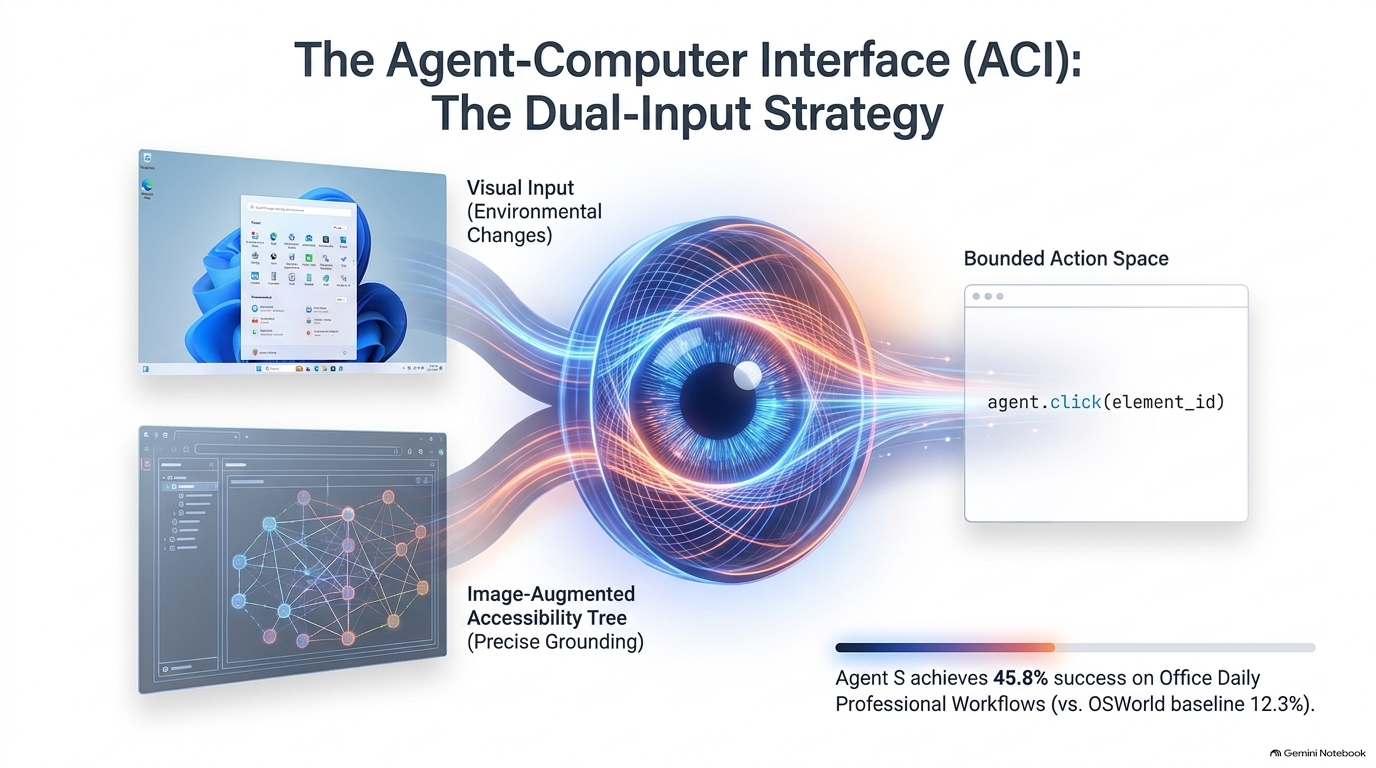
A practical Agent-Computer Interface can merge:
- visual state, for environmental changes, custom-rendered surfaces, icons, and spatial relationships;
- accessibility or UI Automation state, for roles, names, identifiers, bounds, and invokable control patterns;
- bounded actions, where the reasoning layer chooses from a constrained set of operations such as click, type, select, invoke, or scroll.
The bounded action space matters. It prevents the model from directly generating arbitrary OS operations and creates a natural place to enforce permissions, logging, retries, and safety checks.
5. Self-Healing Locators Need Multiple Signals
Desktop locators fail for ordinary reasons: hierarchy changes, dynamic IDs, application upgrades, layout shifts, virtualization, and differences across machines. Re-running a brittle selector search with the same assumptions does not solve the problem.
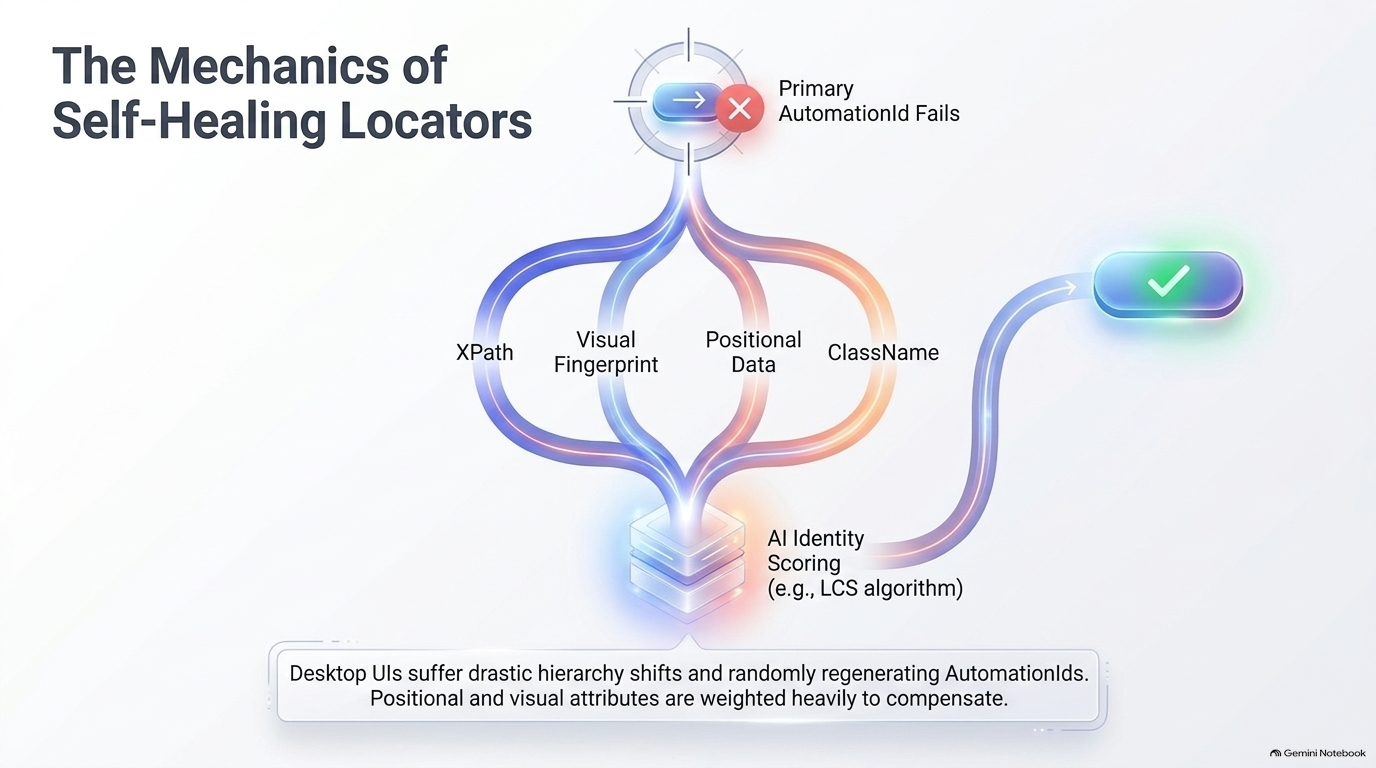
A self-healing resolver can score alternative candidates using several signals at once: XPath or tree structure, class names, positional relationships, labels, neighboring elements, and visual fingerprints. When a primary identifier fails, the system searches for the most plausible replacement rather than immediately terminating the test.
The risk is false recovery. A system that silently clicks the wrong control is more dangerous than one that fails fast. Self-healing therefore needs confidence thresholds, evidence logging, and an explicit distinction between automatic recovery and human-review-required recovery.
6. Agentic Optimization Can Destroy the Interface It Is Trying to Control
Agentic code generation introduces a different failure mode: the model may “solve” an automation problem by rewriting the UI in ways that make the application less stable, less performant, or less testable.
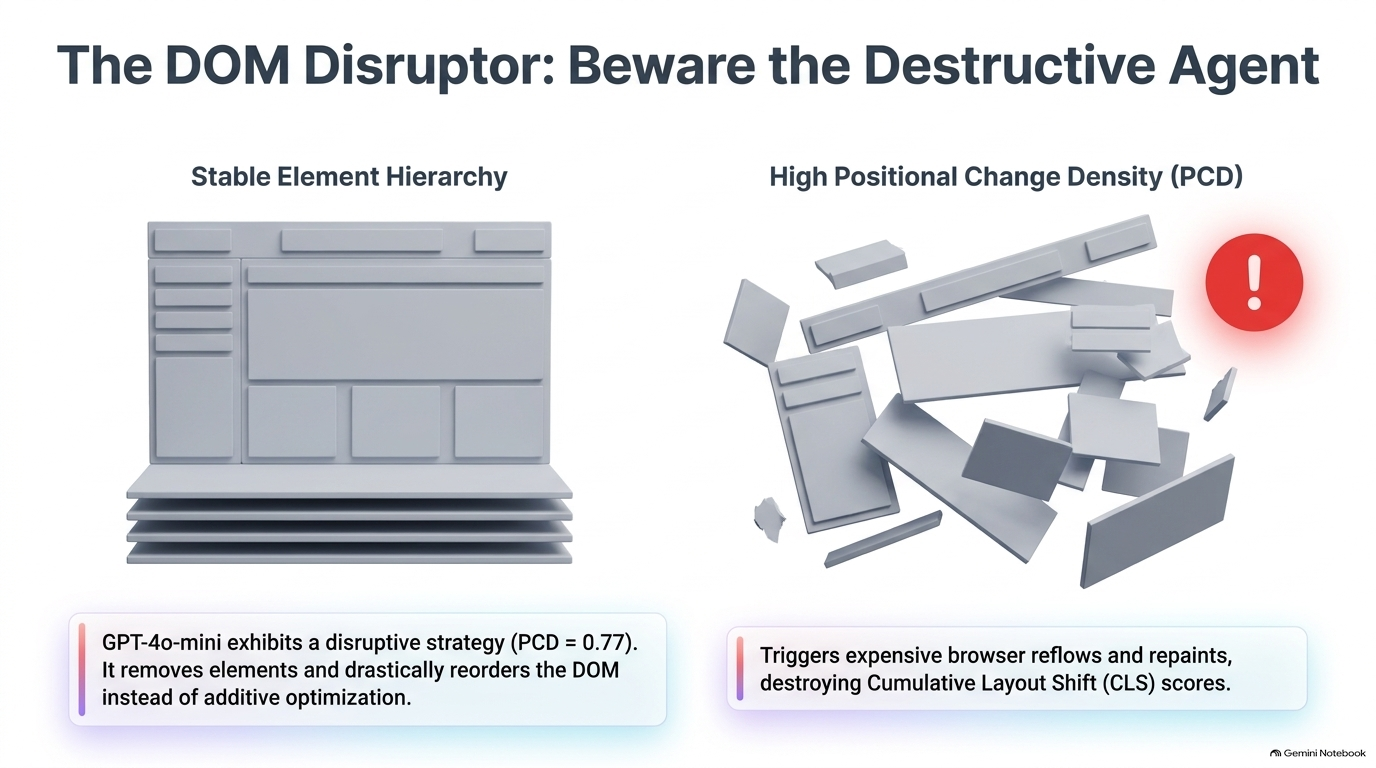
The deck illustrates this with a high positional-change pattern: elements are removed and recreated instead of being updated additively. That kind of optimization can invalidate selectors, trigger unnecessary browser reflow or repaint, and increase layout instability.
For agent-generated UI code, validation should therefore include more than visual correctness. It should check structural churn, layout-shift behavior, accessibility continuity, event-handler stability, and whether identifiers remain predictable across renders.
7. Orchestration Becomes a First-Class System
As automation grows beyond single-step tasks, the model itself is not the whole system. A planner decomposes intent, execution agents operate tools, monitoring components detect failure or drift, and persistent memory carries forward useful state.
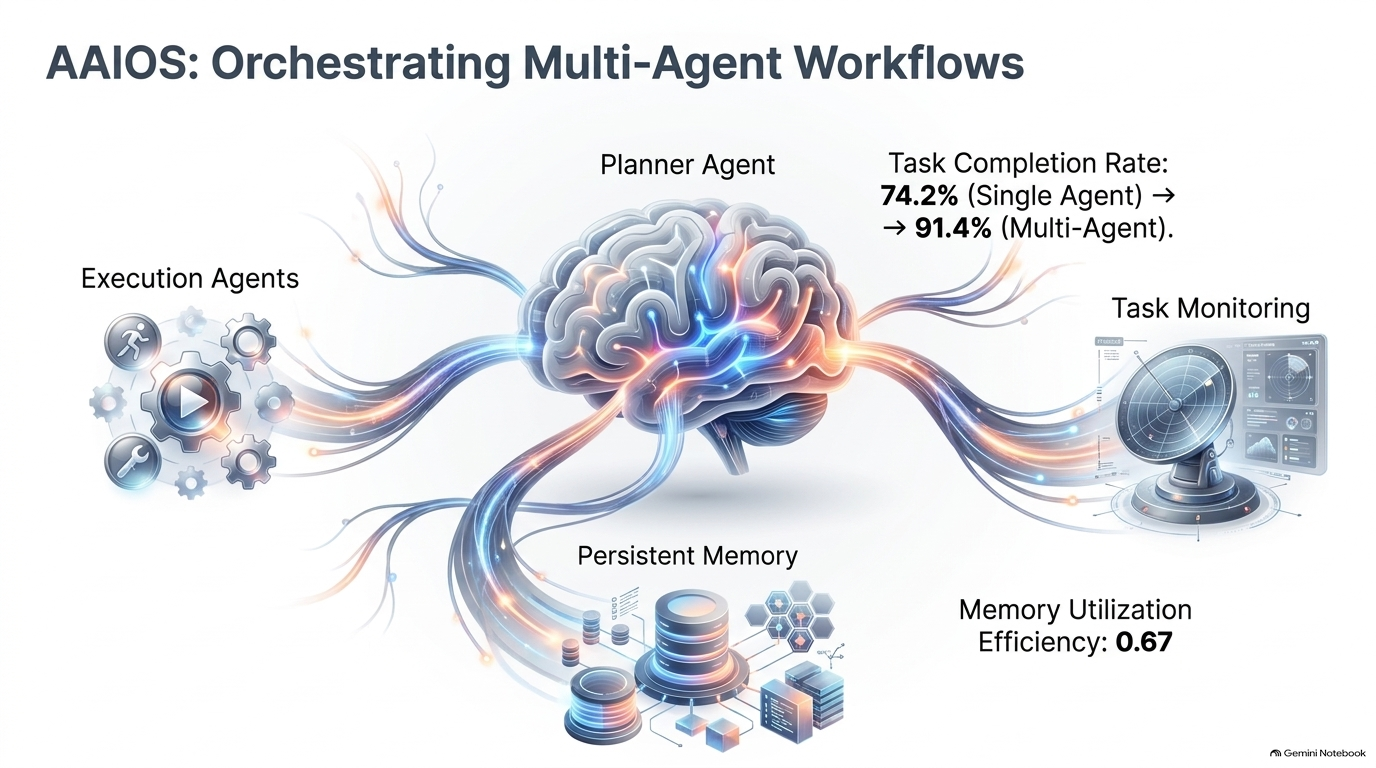
This is the point where automation starts to resemble an operating system for agents. The orchestration layer decides which capability should act, in what sequence, with what context, and under what constraints.
The design challenge is coordination overhead. More agents can increase capability, but also create more handoffs, more state transitions, and more opportunities for inconsistent assumptions. Multi-agent design is justified when specialization or parallelism materially improves task completion—not simply because multiple agents are fashionable.
8. Evaluate Workflows, Not Isolated Clicks
A benchmark for agentic desktop automation should model real work rather than synthetic pointer accuracy. The deck emphasizes personas and domains spanning business, administration, technical work, creative tasks, and general-user workflows.
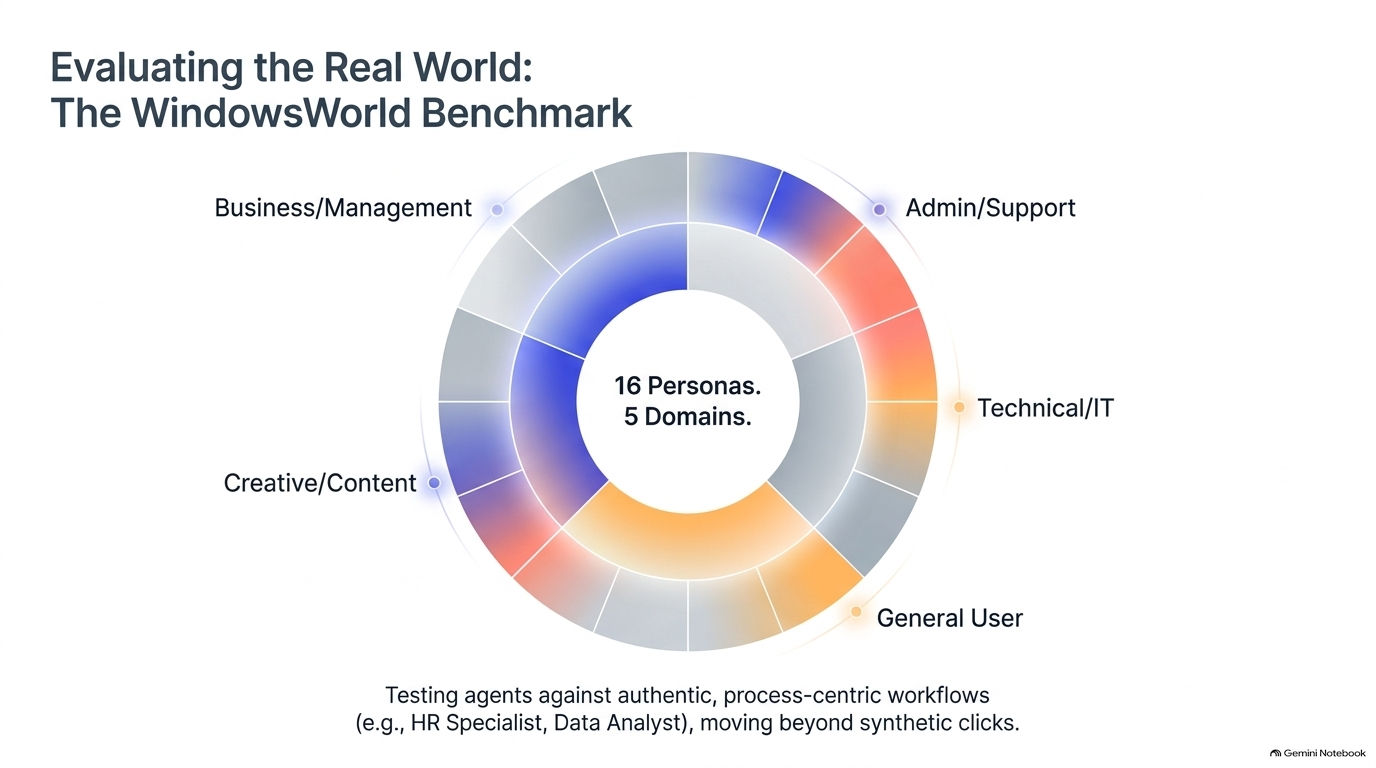
That is the right direction because enterprise automation failures often emerge across transitions: opening a document from one application, extracting information in another, updating a third system, then validating the result. A benchmark that measures only whether a model can click a target misses planning, recovery, memory, and cross-application context.
The key evaluation unit should be an end-to-end task with observable completion criteria.
9. Human Review Still Matters in Test Generation
Generative systems can accelerate the creation of test intents, environments, and candidate scenarios, but uncontrolled generation can easily drift away from realistic user behavior.
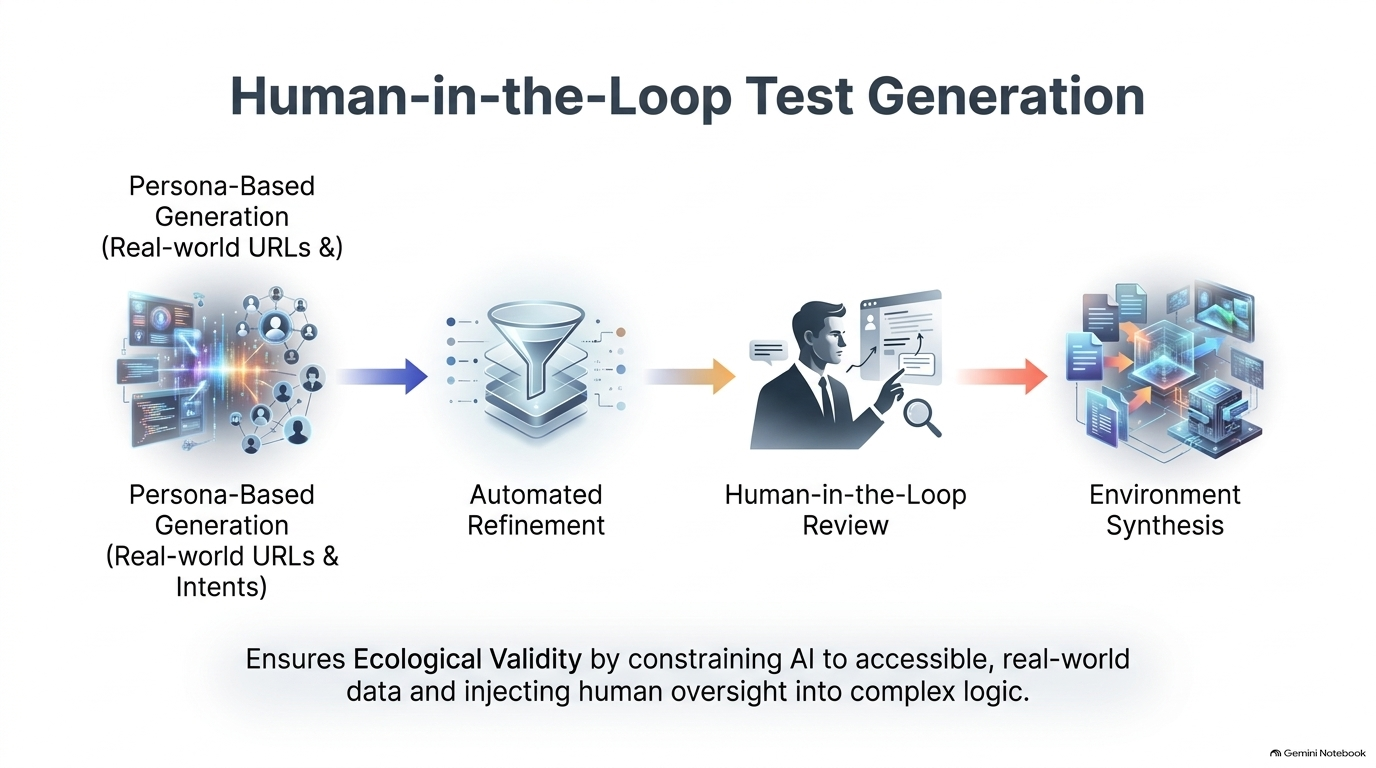
A stronger pipeline starts from real personas and accessible workflows, filters or refines the generated cases automatically, then uses human review for ambiguous logic and high-impact scenarios. Environment synthesis can follow once the test intent is credible.
Human review is most valuable at the points where a wrong assumption changes business meaning: entitlement, approval logic, destructive actions, financial outcomes, security boundaries, and irreversible workflow transitions.
10. Production Systems Will Be Hybrid by Design
The production architecture in the deck converges on three implementation patterns rather than one universal solution.
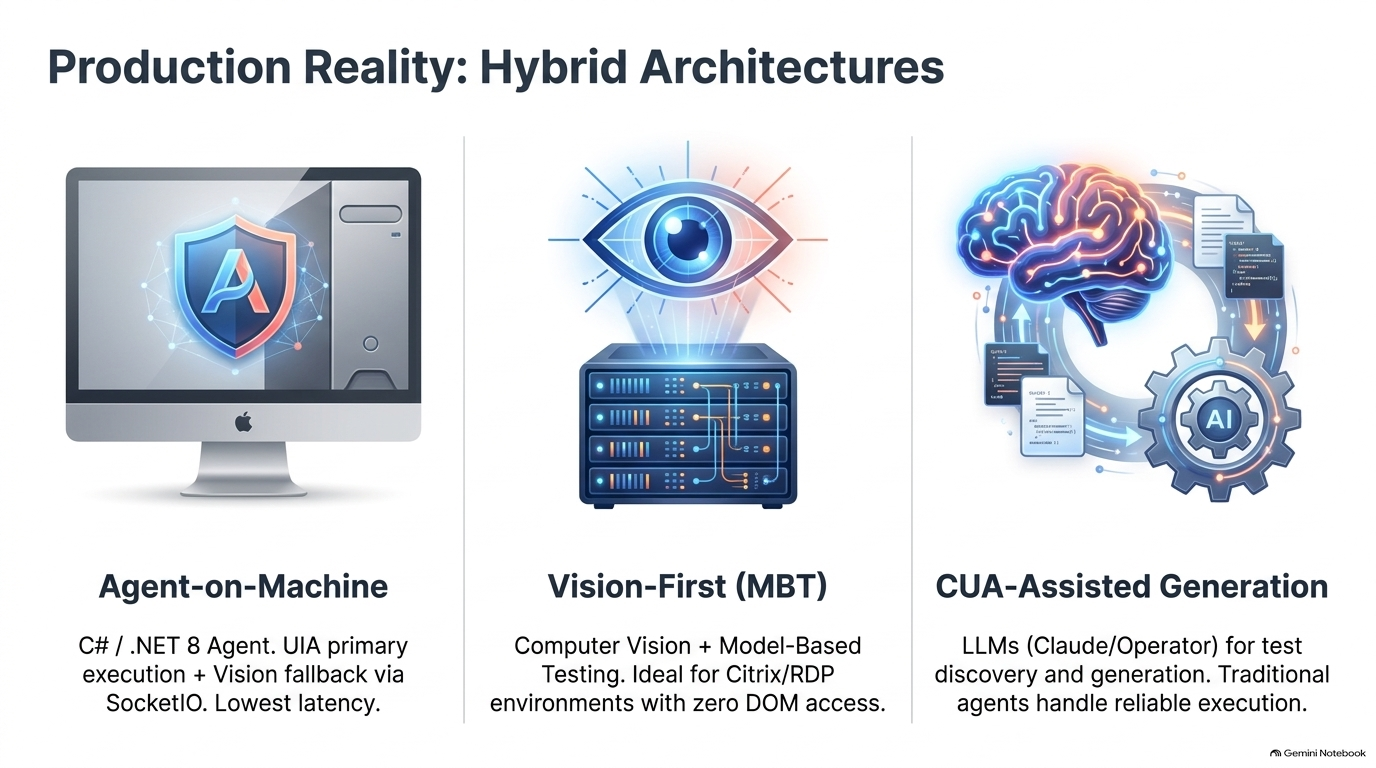
Agent-on-machine puts a native runtime close to the application and favors UI Automation or other OS-level APIs for low-latency execution, with vision as a fallback. This works well when the environment is controlled and native automation surfaces are available.
Vision-first model-based testing is appropriate when the application is accessed through Citrix, RDP, streamed desktops, or custom rendering where no useful object model reaches the automation process.
CUA-assisted generation uses language models and computer-use agents for discovery, planning, and test generation while delegating stable execution to traditional automation components.
These patterns are not mutually exclusive. A mature platform can switch among them at runtime based on what the current application exposes.
11. Natural Language Is an Interface, Not an Execution Primitive
Natural-language automation is useful because humans think in intent: “Click Save in the File menu,” not “invoke element 9837 at this tree path.” But production automation should not execute raw language directly.
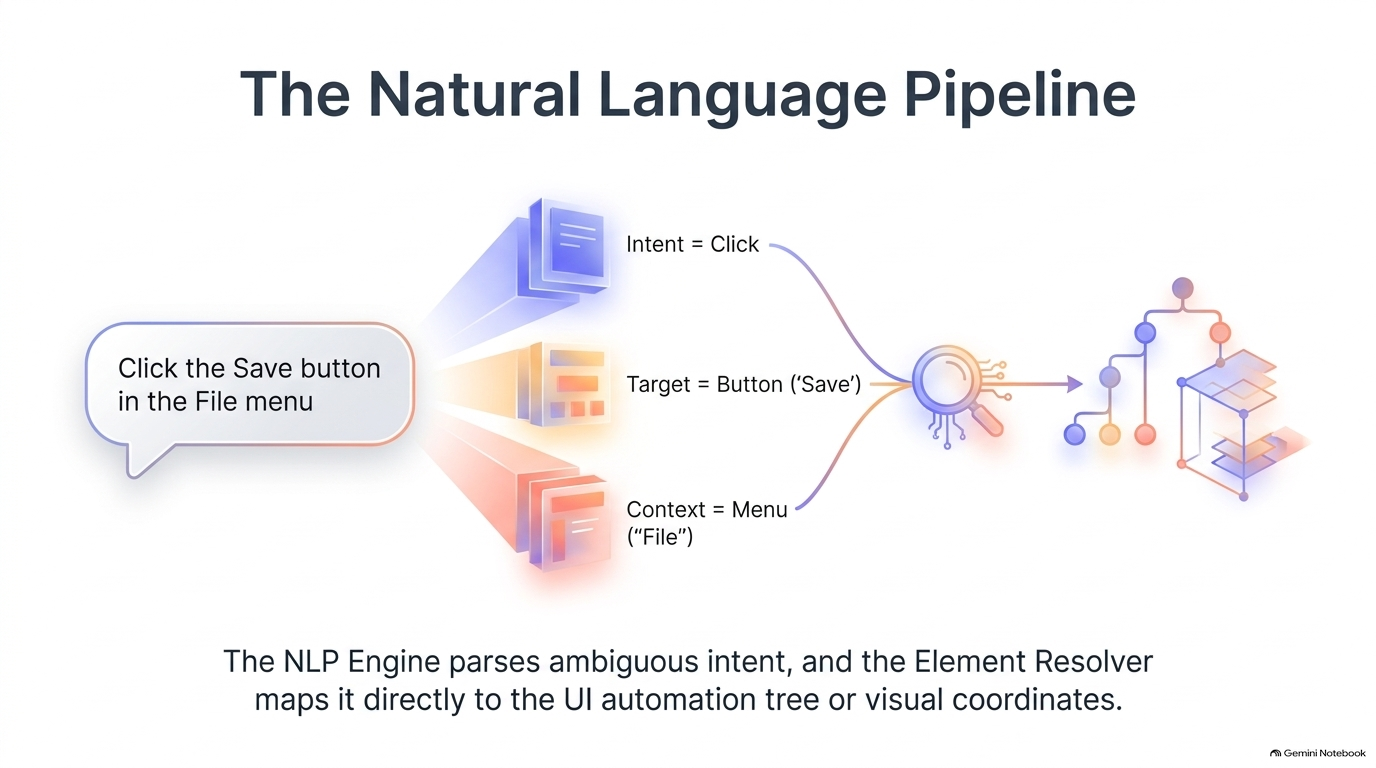
A language layer should parse the instruction into structured fields such as intent, target, and context. An element resolver can then map those fields to a UI Automation node, visual candidate, or other deterministic control representation.
This makes natural language a declarative front end for automation. The agent can remain flexible at the reasoning layer while the execution layer stays inspectable and constrained.
12. MCP Can Standardize How Agents Reach Automation Tools
As coding assistants and agents gain access to test frameworks, browsers, desktop drivers, and observability systems, the integration surface becomes a scalability problem of its own.
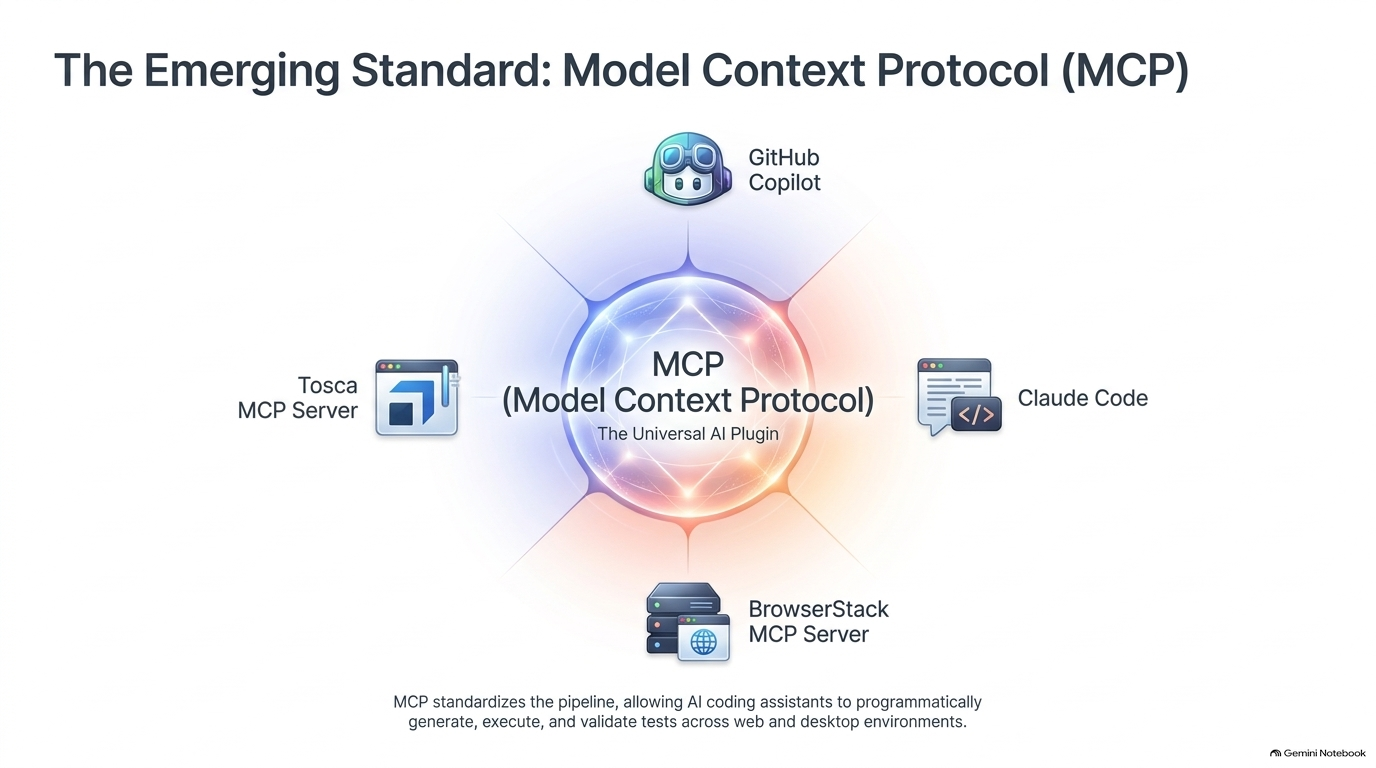
The Model Context Protocol provides a useful abstraction for exposing tools and context to AI clients through a common interface. For GUI automation, that means test generation, execution, inspection, and validation capabilities can be offered as discrete tools rather than hard-wired into each assistant.
MCP does not make unreliable automation reliable by itself. Its value is architectural: it standardizes discovery and invocation, which makes it easier to compose automation capabilities while keeping the execution engines specialized.
13. Choosing an Automation Path Starts with the Constraint
Tool selection should follow the dominant constraint in the target environment rather than a generic “best framework” ranking.
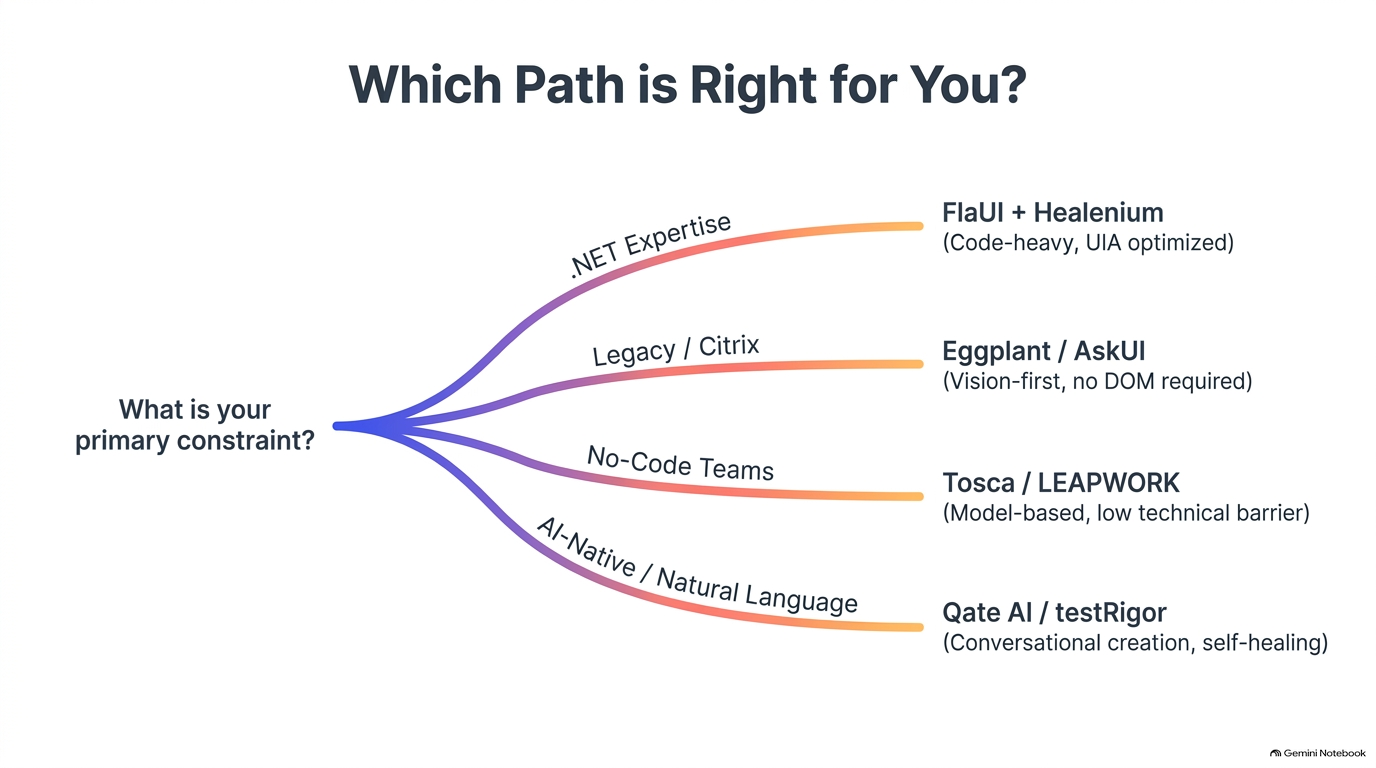
If the team already has strong .NET expertise and the application exposes useful automation properties, a code-heavy native approach is often efficient. If the target is Citrix or another visually mediated surface, a vision-first product is more appropriate. No-code teams may benefit from model-based tooling. Teams prioritizing conversational creation and self-healing may prefer AI-native products, provided they can tolerate the added uncertainty and governance requirements.
The deeper principle is to choose the lowest-entropy execution layer that can reliably reach the application. Use AI to broaden reach and reduce maintenance, not to replace determinism where determinism already works.
Engineering Principles
The architecture ultimately depends on several principles:
-
Reason semantically, execute deterministically.
Let models interpret goals and resolve ambiguity, but route final actions through constrained, inspectable primitives whenever possible. -
Fuse structured and visual state.
Accessibility trees provide precision; pixels provide coverage. A production system needs both. -
Treat recovery as a scored decision.
Self-healing locators should expose confidence, alternatives, and evidence instead of silently guessing. -
Measure end-to-end outcomes.
Success is task completion under realistic workflows, not isolated click accuracy. -
Keep agents observable and governable.
Record plans, element-resolution evidence, actions, screenshots, retries, timing, and policy decisions so failures can be reconstructed.
Final Synthesis
The desktop has no single equivalent of the browser DOM that works across every application. That makes a monolithic automation strategy fragile. Pure UI Automation lacks universal coverage. Pure computer vision is slower and less precise. Pure LLM control is too unconstrained for dependable execution.
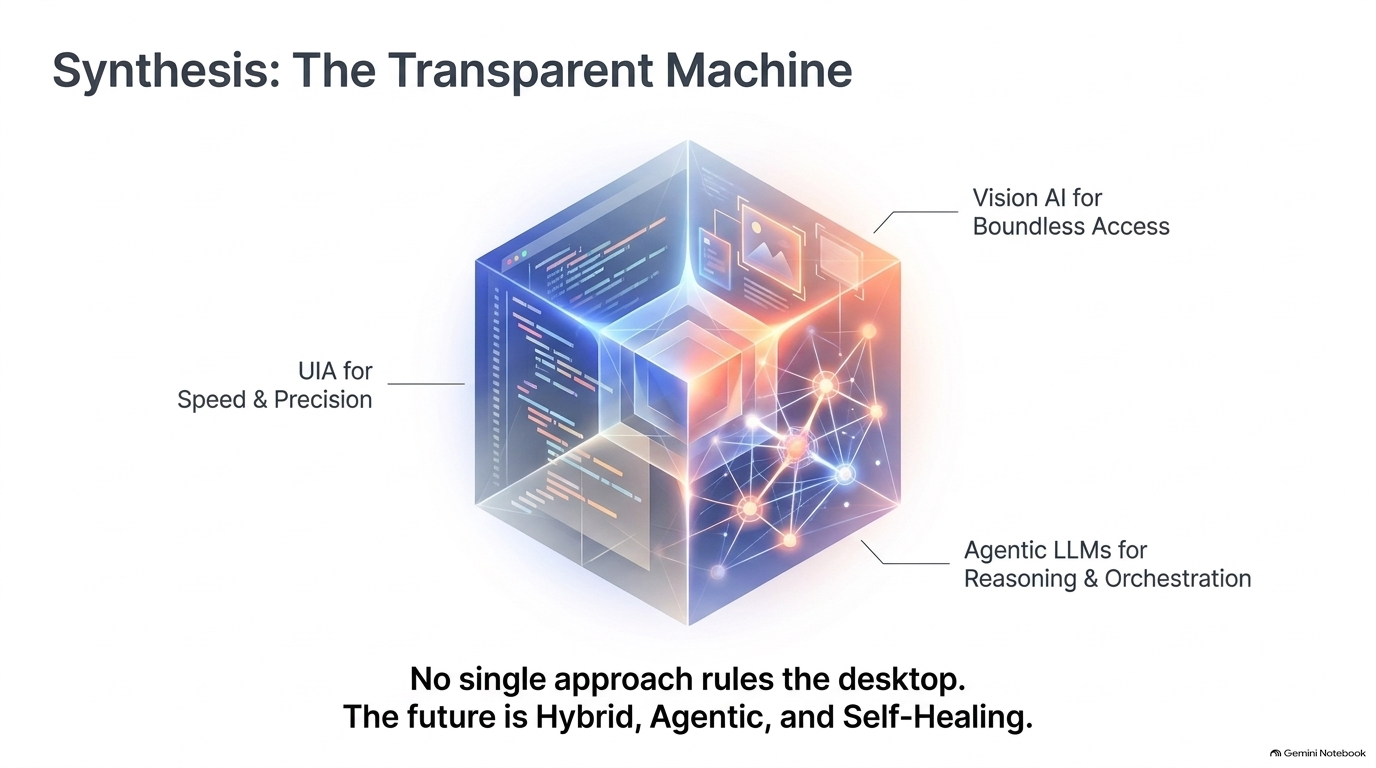
The strongest architecture combines the three layers:
- Deterministic foundation: native UI Automation, accessibility APIs, application-specific drivers, and stable selectors where available.
- Testing layer: workflow-level validation, self-healing element resolution, visual verification, and realistic persona-based scenarios.
- Agent or AI layer: intent parsing, planning, ambiguity resolution, recovery, test generation, and multi-tool orchestration.
- Security and governance: bounded actions, least-privilege tool access, approval gates for destructive operations, and policy enforcement.
- Observability layer: screenshots, accessibility snapshots, model decisions, locator confidence, action traces, retries, latency, and final state checks.
- Production outcome: an automation system that can reach more interfaces without giving up the speed and precision of deterministic execution.
Closing Thought
Autonomous GUI automation will not be won by the model that can click the most pixels. It will be won by systems that know when to reason, when to see, when to trust structure, and when to fall back.
The future of desktop automation is hybrid, agentic, and self-healing—but only when deterministic execution remains underneath it.